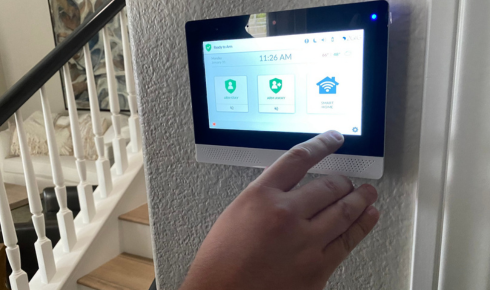
Best Smart Home Security Systems Compared
Choosing the right smart home security systems can feel overwhelming with so many options available today. From video doorbells to full home monitoring setups, each system offers different features, price points, and levels of protection. Whether you live in an apartment or an independent house, understanding what each type of system offers helps you make a smarter, more informed decision. In this guide, we’ll compare different types of smart home security systems so you can choose what fits your home and budget best.
1. Types of Smart Home Security Systems
Before comparing features, it helps to understand the main categories of smart home security systems available today.
- DIY wireless systems — easy to install without professional help
- Professionally installed systems — set up by technicians, often with monitoring plans
- Standalone smart devices — individual products like cameras or doorbells, not a full system
- Integrated hub-based systems — connect multiple devices through one central app
Each type serves a different need, so identifying your priorities — convenience, budget, or comprehensive coverage — helps narrow down the right choice.
2. Smart Doorbell Cameras
Smart doorbell cameras are one of the most popular entry points into home security.
- Allow you to see and speak to visitors remotely
- Send instant alerts when motion is detected
- Store footage locally or via cloud subscription
These are ideal for apartments or smaller homes where a full security system may not be necessary. They’re also one of the most affordable ways to start building a smart home security system without a big upfront investment.
3. Indoor and Outdoor Security Cameras
Cameras remain the backbone of most smart home security systems, offering continuous monitoring both inside and outside your home.
- Outdoor cameras should be weatherproof and offer night vision
- Indoor cameras help monitor common areas without invading personal privacy
- Look for two-way audio and motion-triggered alerts for added functionality
When comparing camera-based systems, check whether footage storage is local (SD card) or cloud-based, since this affects both cost and accessibility of your recordings.
4. Smart Locks and Access Control
Smart locks add another layer of security by controlling who can enter your home and when.
- Keyless entry through PIN codes, fingerprint, or smartphone app
- Remote locking/unlocking, useful for letting in guests or deliveries
- Activity logs showing exactly who entered and when
Compared to traditional locks, smart locks offer more control and convenience, making them a valuable addition to any smart home security setup, especially for families with domestic help or frequent visitors.
5. Motion Sensors and Alarm Systems
Motion sensors and alarms form the core alert system in most comprehensive security setups.
- Door and window sensors detect unauthorized entry attempts
- Motion sensors trigger alerts for movement in restricted areas
- Loud alarms can deter intruders and alert neighbors or monitoring services
When comparing systems, check whether alarms connect to a monitoring service that can contact authorities, or whether alerts are sent only to your phone.
6. Monitored vs Self-Monitored Systems
One of the biggest decisions when choosing smart home security systems is whether to opt for professional monitoring or manage alerts yourself.
Professionally Monitored Systems
- A monitoring center receives alerts and can contact emergency services
- Usually comes with a monthly subscription fee
- Offers peace of mind, especially when you’re away from home for long periods
Self-Monitored Systems
- You receive alerts directly on your smartphone
- No recurring monthly fees in most cases
- Requires you to personally respond to alerts and decide on action
Your choice here often depends on how much you’re willing to pay monthly versus how actively you can monitor alerts yourself.
7. Integration with Smart Home Ecosystems
Modern smart home security systems often integrate with broader smart home setups for added convenience.
- Voice assistant compatibility for hands-free control
- Integration with smart lighting to simulate occupancy when away
- Compatibility with smart thermostats for a fully connected home experience
If you’re building a broader smart home setup, check out our guide on budget home improvement ideas for tips on integrating smart technology affordably (internal link opportunity).
8. Cost Comparison and Budget Planning
Understanding the cost structure helps you compare systems more effectively.
- Basic DIY kits — lowest upfront cost, no monthly fees
- Mid-range systems — moderate upfront cost with optional monitoring plans
- Premium monitored systems — higher upfront cost plus ongoing subscription fees
When budgeting, factor in installation costs, ongoing subscription fees, and potential costs for additional devices as your needs grow over time.
Frequently Asked Questions
1. What is the best type of smart home security system for apartments? DIY wireless systems and smart doorbell cameras are usually the best fit for apartments, since they require no permanent installation.
2. Do smart home security systems need a monthly subscription? Not always. Many self-monitored systems work without a subscription, while professionally monitored systems typically require one.
3. Are smart locks safe to use for home security? Yes, smart locks offer secure keyless entry and activity logs, making them a reliable addition to most security setups when used correctly.
4. Can smart home security systems be installed without professional help? Yes, many DIY systems are designed for easy self-installation, though professionally installed systems may offer more comprehensive coverage.
5. What should I look for when comparing home security cameras? Look for night vision, weatherproofing (for outdoor use), two-way audio, and clear storage options like cloud or local SD card recording.
6. Is professional monitoring worth the extra cost? It depends on your needs. Professional monitoring offers added peace of mind, especially for those who travel often or want emergency response support.
Conclusion
Comparing smart home security systems comes down to understanding your priorities — whether that’s affordability, comprehensive coverage, or professional monitoring support. From doorbell cameras to fully integrated hub-based systems, there’s an option to fit every home and budget. Start by identifying your must-have features, compare a few systems based on this guide, and choose the setup that gives you the right balance of security and convenience for your home.
Suggested Image Alt Text:
- “Smart doorbell camera installed at a home entrance”
- “Homeowner controlling smart home security system via smartphone app”
- “Outdoor security camera monitoring a home’s front yard”